no it’s not NOW, you haven’t change your version… it’s just that your release was called “+” ← ;)
2014-06-24 17546, 2014
infirit correct himself, yep it shows up there
2014-06-24 17506, 2014
jesus2099
and this is a bug as one of my code did not expect some characters like this (regex) :)
2014-06-24 17538, 2014
jesus2099
so ok it’s was this error, s onow it should also work on those kind of titles, thanks very very much…
2014-06-24 17555, 2014
infirit
Ah, I see
2014-06-24 17530, 2014
warp
jesus2099: I don't know, I always do right-mouse-button -> inspect element, and then click on the console tab.
2014-06-24 17559, 2014
warp
jesus2099: I think the key to open that developer screen is or was different on one of Linux, Windows or Mac, and I could never remember the key.
2014-06-24 17552, 2014
simukis_
f12 works in both linux and windows. MacOSX uses Cmd+something, warp
2014-06-24 17521, 2014
warp
simukis_: yeah, so remembering F12 doesn't help.
2014-06-24 17517, 2014
jesus2099
warp: when i do inspect then console, i’m in the console that, for unknown reason, doesn’t display MASS MERGE error (it does display another error but not this one)…
2014-06-24 17550, 2014
jesus2099
it displays two warnings for some other code but not this errror…
2014-06-24 17506, 2014
jesus2099
well anyway never mind sorry i shouldn’t say all this is useless, really :)
2014-06-24 17503, 2014
warp
jesus2099: weird, I should try this secret browser console next time I'm debugging some javascript :)
2014-06-24 17528, 2014
infirit
And here I picked the first console I found in the menu and sparked all this discussion 😀
2014-06-24 17554, 2014
jesus2099
warp : it’s not that secret as it’s in the same tools > web developer menu. but it’s not linked to the DOM, you can’t relaly debug, … BUT you can see more error messages… :D
2014-06-24 17530, 2014
kepstin-laptop__ joined the channel
2014-06-24 17506, 2014
KRSCuan
<jesus2099> CTRL+SHIFT+K and CTRL+SHIFT+J, two different consoles… :/ ← don't forget the Alt+F2 console!
2014-06-24 17547, 2014
jesus2099
wow, KRSCuan, that one does not work here, but it seems that a little various console merge should be done :)
2014-06-24 17507, 2014
kepstin-laptop
on firefox, the ctrl-shift-j console is the only one that userscript stuff shows up in :/
2014-06-24 17516, 2014
kepstin-laptop
it's meant for debugging browser extensions and stuff
2014-06-24 17501, 2014
kepstin-laptop has never heard of an alt-f2 console
2014-06-24 17528, 2014
kepstin-laptop
alt-f2 is a global window manager hotkey for me, it opens the 'run application' dialog...
2014-06-24 17535, 2014
kepstin-laptop
If i hit alt-f2 then type 'lg', I get the javascript console in the gnome-shell compositor, which lets me use javascript to poke at windows and stuff :)
2014-06-24 17556, 2014
reosarevok fixes a few feats to make KRSCuan happy
2014-06-24 17500, 2014
reosarevok
(also to rest from classical)
2014-06-24 17518, 2014
simukis_
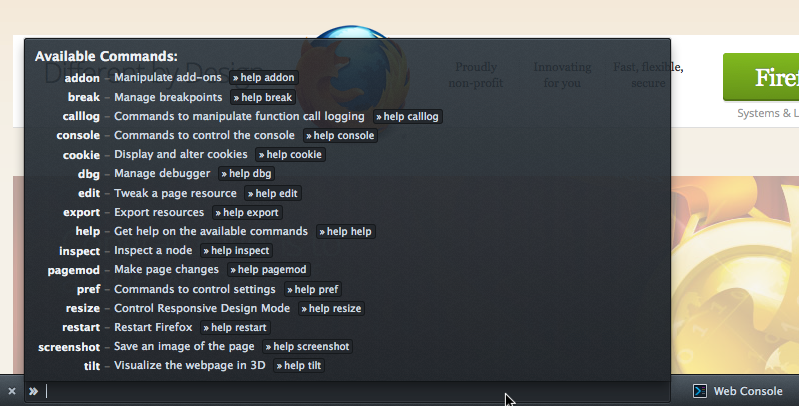
kepstin-laptop: well… firefox has shift+f2 which opens the command line
2014-06-24 17548, 2014
kepstin-laptop
huh, never seen that before
2014-06-24 17553, 2014
kepstin-laptop
that looks kind of neat
2014-06-24 17553, 2014
simukis_
but that command line doesn’t run javascript, nor does it show anything other than an input field.